> For the complete documentation index, see [llms.txt](https://documentation.pushly.com/llms.txt). Markdown versions of documentation pages are available by appending `.md` to page URLs; this page is available as [Markdown](https://documentation.pushly.com/integration/web-push/safari/safari-on-mobile-ios-ipados.md).
# Safari on Mobile (iOS / iPadOS)
Step-by-step guide to enabling Web Push for Safari web browser on Mobile iOS/iPadOS devices
## Requirements
In order for your website to support Web Push on iOS devices it must be installable as a Progressive Web App (PWA).
Once your site is installable as a PWA, any visitor using iOS 16.4+ that adds the site to their home screen is eligible to subscribe to and receive web push notifications.
Ensure you have also completed the [Web Push Implementation Steps](/integration/web-push.md).
{% hint style="info" %}
Safari Web Push requires a 2-step permission prompt. If you do not have at least one 2-step prompt enabled in the platform visitors will not be prompted to subscribe to notifications.
{% endhint %}
## Step 1: Create & Expose the Web App Manifest
The web app manifest is a JSON file that tells browsers how you want your site to display as an app in the visitor's operating system.
This file is typically hosted in the public root folder and linked to on all HTML pages. Its recommended extension is `.webmanifest` but any filename will work as long as it's delivered with the `application/manifest+json` content type or any other valid JSON content type such as `text/json`. Historically sites have used `manifest.json` as the filename.
Create a file, for example, `site.webmanifest` with the following content, replacing the example `name` and icon `src` values with relevant values for your site:
```json
{
"$schema": "https://json.schemastore.org/web-manifest-combined.json",
"name": "Example",
"display": "standalone",
"icons": [
{
"src": "https://example.com/images/logo-512x512.png",
"sizes": "512x512",
"type": "image/png"
}
]
}
```
{% hint style="info" %}
For a full listing of fields that can be provided in the manifest see the [MDN article on Web App Manifests](https://developer.mozilla.org/en-US/docs/Web/Manifest).
{% endhint %}
The manifest is typically served from the public root of your site; for example: `https://www.example.com/site.webmanifest` but it is also possible to serve the manifest from a subdirectory. Note that serving from a subdirectory may impact your ability to implement additional PWA features in the future.
In addition to making the manifest publicly available, you must also add a line to each page of your site that informs the browser of the location of your manifest file. For example, place the following line of code within the `` section on each page of your site:
```
```
Once the file is placed and the above line added to pages on your site you can test the implementation on an iOS device running iOS version 16.4+.
## Step 2: Test
Visit your site in Safari on a device running iOS/iPadOS version 16.4+, click on the `Share` icon, and tap `Add to Home Screen`. Navigate to your home screen, find the icon for your site, and open it. If the manifest was properly implemented, your site should open as a standalone app without showing any of the browser controls.
## Step 3 (Optional): Direct Visitors to Add Your Website to Their Home Screen
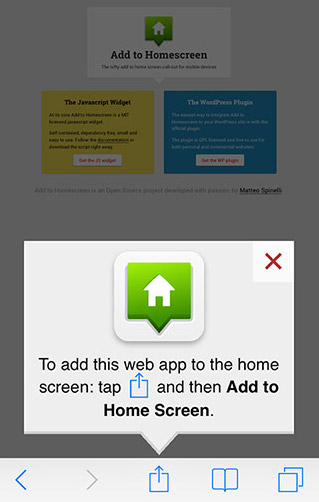
Since Web Push on Safari requires the visitor to install your site as a PWA you may want to add elements to your site that direct the visitor to do so.
You may implement this as a button on your site, a popup with instructions that is displayed directly above the share button, a banner, or any other element that will help direct the visitor to perform the necessary steps to add your site as a PWA.
There are several open source projects that can help you implement this functionality or if you use Wordpress many PWA plugins provide options for this.
## FAQ / Debugging
#### Site Opening in Browser Instead of Standalone
If your site is still opening in the browser instead of as a standalone app open your site's debug console and look for a message saying that the browser detected no manifest. If you see this message check to make sure you can load the manifest directly in the browser and that its content type is correctly set.
#### No 2-Step Prompt Being Shown
If your app is opening in PWA/standalone mode but you are not seeing the permission prompt make sure that:
1. You have at least one 2-step prompt enabled within the platform Prompts settings
2. You are on an iOS device that supports web push (iOS 16.4+)
---
# Agent Instructions
This documentation is published with GitBook. GitBook is the documentation platform designed so that both humans and AI agents can read, navigate, and reason over technical content effectively. Learn more at gitbook.com.
## Querying This Documentation
If you need additional information that is not directly available in this page, you can query the documentation by asking a question.
Perform an HTTP GET request on the following URL with the `ask` and `goal` query parameters:
```
GET https://documentation.pushly.com/integration/web-push/safari/safari-on-mobile-ios-ipados.md?ask=&goal=
```
`ask` is the immediate question: it should be specific, self-contained, and written in natural language.
`goal` is what the user is ultimately trying to achieve, the reason they need the answer. Sharing it helps GitBook give you a better, more relevant answer. A goal is most helpful when it describes the outcome the user wants rather than restating the question. For example, with `ask=how do I create an API token`, a goal like `automate deployments from our CI pipeline` lets GitBook tailor the answer to that use case.
The response will contain a direct answer to the question and relevant excerpts and sources from the documentation.
Use this mechanism when the answer is not explicitly present in the current page, you need clarification or additional context, or you want to retrieve related documentation sections.